CraftAI Deployment specification for Craft AI Advanced Assistants
This document defines the deployment requirements for creating advanced assistants in Craft AI chat interface. Deployments used by Assistants must adhere to this specification to ensure they can be properly integrated and function as expected within the Craft AI chat interface.
Overview – Integration Requirements
To connect a CraftAI deployment as an Advanced Assistant, it must:
- be exposed as an endpoint – Deployment must use
execution_rule="endpoint" - map inputs and outputs correctly – Use the exact endpoint names defined in this specification
- follow the input/output contract – Accept and return data in the formats specified below
- not have a name starting with craftgpt- – Pipelines and deployments with the prefix craftgpt- are reserved: do not create, update, delete, nor rely on such resources
The Craft AI chat interface will handle:
- formatting and saving user messages and chat session history,
- uploading file attachments to the object storage and providing their keys,
- rendering responses with proper sources and citations,
- triggering the record usage history internal deployment
TL;DR – Input and output format
To get a quick look at the required input and output configuration format, check the InferenceInputBody
and InferenceOutputBody schemas in the Detailed Schema Reference section below, or
by looking at shared/pydantic_classes/schemas.py in the codebase.
How the Craft AI chat interface interacts with your deployment
The chat application handles all the complexity of triggering your deployment. Here's the complete flow:
sequenceDiagram
    participant User
    participant CraftAI as Craft AI Chat Interface
    participant ObjectStorage as Object Storage
    participant Deployment as your deployment
    participant UsageHistory as craftgpt-record-usage-history<br/>deployment

    User->>CraftAI: Sends message + optional files

    alt User attached files
        CraftAI->>ObjectStorage: Upload files
        ObjectStorage-->>CraftAI: Return s3_keys
    end

    CraftAI->>CraftAI: Build input payload
    CraftAI->>Deployment: sdk.trigger_endpoint("your-deployment-name", input_body_file)

    Deployment-->>CraftAI: Execution complete with outputs

    alt Success (status=Succeeded AND error=null)
        CraftAI->>User: Display answer + sources
        CraftAI->>UsageHistory: sdk.trigger_endpoint("craftgpt-record-usage-history", metrics)
    else Error (status≠Succeeded OR error≠null)
        CraftAI->>User: Display error message
    end
Step-by-step breakdown:
- User sends a message and optionally attaches files.
- Craft AI chat interface reconstructs the chat session mainline history and optionally uploads any attached files to the object storage.
- Craft AI chat interface triggers your deployment using
sdk.trigger_endpoint, passing the chat session data as a JSON file in theinput_body_fileinput. It then polls for completion. - Once execution is complete, Craft AI chat interface extracts the outputs.
- If
erroris null and status is "Succeeded", it displays and saved theanswerandsourcesin the chat UI. It also triggers thecraftgpt-record-usage-historyinternal deployment with the inference metrics for analytics. - Otherwise, it displays a generic error message to the user.
What you need to implement
Your pipeline only needs to
-
Read the
input_body_filefile in JSON format. -
Process the messages and generate a response.
- Return the outputs in the correct format.
The Craft AI chat interface will handle all the rest (file uploads, input formatting, output rendering, usage history recording, etc).
Required configuration for creating an assistant-compatible deployment
There is no constraint on the internal logic of your pipeline – you can use any LLM, tools, or custom code you want. However, the deployment configuration must follow the following rules to be compatible with the chat application.
Deployment Type
Your deployment must be configured as an endpoint to be accessible from the chat application.
Deployment Mode
There is no requirement on the mode of the deployment, but we recommend using low_latency to ensure the best responsiveness in the chat app.
Pipeline and deployment names
Pipelines and deployments with the prefix craftgpt- are reserved: do not create, update, delete, nor rely on such resources
Input provided by the Craft AI chat interface
When a user interacts with the chat application, it automatically constructs an input JSON file containing the chat session history and other relevant information. This file is passed to your deployment in a file input named input_body_file. Your pipeline must read and parse this file to access the input data.
Deployment inputs mapping requirements
The deployment must accept a file input named input_body_file. The chat application will provide the chat session data as a JSON file. The JSON format which will be provided in this file by the Craft AI chat interface, is described in the Input Format section below.
| Endpoint input name | Pipleine input data type | Description |
|---|---|---|
input_body_file |
FILE | JSON file with chat session history and request parameters. The format of this JSON file is described in the Input Format section below. Your pipeline code must read and parse this file to access the input data. |
Note
The endpoint may accept additional inputs, but the Craft AI chat interface will only provide this specific input. Your pipeline should be designed to work with this input file and ignore any other inputs.
Input mapping configuration example
Content and format of the input_body_file JSON file
The chat application automatically constructs the input JSON file with the following structure. You do not need to create this - it's provided to your deployment when triggered.
| Field | Type | Required | Description |
|---|---|---|---|
messages |
array | Yes | chat session history including user messages and file attachments |
Message Structure
Each message in the messages array contains:
role: One of"user"or"assistant"content: Array of content blocks (text or file references)
Content blocks can be:
- Text block:
{"type": "text", "text": "message content"} - S3 file block:
{"type": "s3", "s3_key": "path/to/file.pdf"}referencing a key stored in the instance object storage, when the user has uploaded a file in the chat.
For reference, see the InferenceInputBody schema in the Detailed Schema Reference section below.
User file handling
When creating an assistant in the Craft AI chat interface, you can disable or enable file uploads. If you enable file uploads, users will be able to attach files in the chat interface, and your deployment will receive the object storage file blocks in the input JSON. In this case, Your pipeline must be able to:
- Download files from the instance object storage, using the provided `s3_key`
- Process common file types (PDF, TXT, DOCX, images, etc.)
- Handle cases where files may be inaccessible or corrupted
Examples
Content of input_body_file examples
Chat session:

Resulting content in input_body_file:
Chat session:
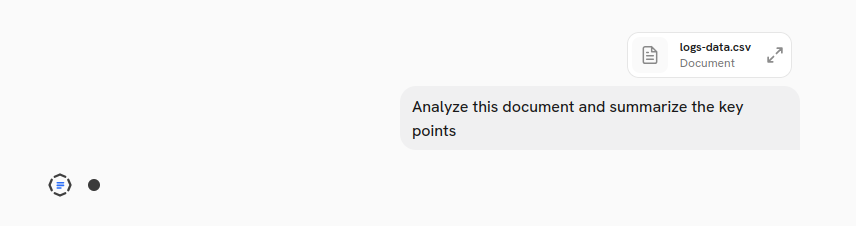
When users upload files in the chat (PDFs, images, documents), the Craft AI chat interface uploads them to the object storage and provides the key:
Chat session:
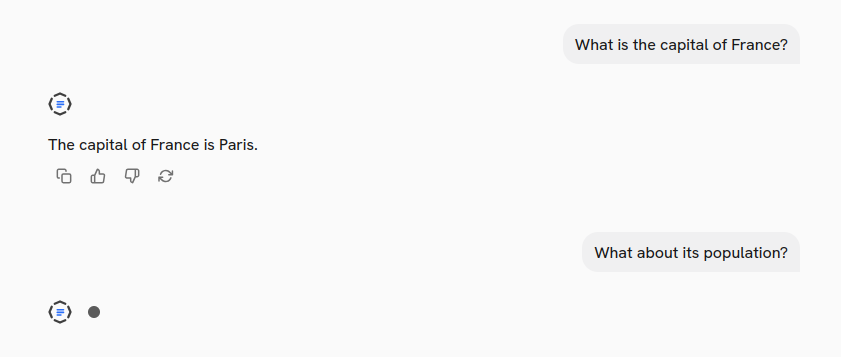 The
The messages array includes the full conversation history, allowing your pipeline to generate context-aware responses:
{
  "messages": [
    {
      "role": "user",
      "content": [
        {
          "type": "text",
          "text": "What is the capital of France?"
        }
      ]
    },
    {
      "role": "assistant",
      "content": [
        {
          "type": "text",
          "text": "The capital of France is Paris."
        }
      ]
    },
    {
      "role": "user",
      "content": [
        {
          "type": "text",
          "text": "What about its population?"
        }
      ]
    }
  ]
}
Output returned to the Craft AI chat interface
Deployment outputs mapping requirements
The deployment must provide these outputs for proper display in the chat UI:
| Endpoint output name | Pipeline output data type | Required | Purpose |
|---|---|---|---|
answer |
STRING | Yes | Main response displayed to the user. Displayed as the assistant message in the chat session. |
sources |
JSON | No | List of sources used to generate the answer, with their extracts and metadata. Moreover, sources marked as cited, are displayed as clickable tags in the chat UI. |
consumed_tokens |
JSON | No | Consumed tokens by each model (llm, embeddings, ...) for debugging and analytics. Not displayed in the chat UI but used to store usage metrics when the record_usage_history internal deployment is triggered by the Craft AI chat interface after each response. |
specific_info |
JSON | No | Specific information about the inference, such as duration and other metrics, for debugging and analytics. Not displayed in the chat UI. |
error |
JSON | No | Error information (must be None or not provided on success). It is only used for internal logging and is not displayed in the chat UI. If the error field is not null, the chat app will display the error message instead of the answer. |
Outputs mapping configuration example
sdk.create_deployment(
    ...
    outputs_mapping=[
        OutputDestination(
            "pipeline_output_name": "answer", # name exposed by your pipeline code
            "endpoint_output_name": "answer"  # name required
        ),
        OutputDestination(
            "pipeline_output_name": "sources",
            "endpoint_output_name": "sources"
        ),
        OutputDestination(
            "pipeline_output_name": "consumed_tokens",
            "endpoint_output_name": "consumed_tokens"
        ),
        OutputDestination(
            "pipeline_output_name": "specific_info",
            "endpoint_output_name": "specific_info"
        ),
    ]
)
Output Requirements
answeris mandatory - the chat app expects this field.sourcesis optional but can be used to enhance the user experience with citations and source transparency.consumed_tokensis optional but highly recommended for internal monitoring.specific_infois optional.- If
erroris non-null, the chat app will display a generic error message to the user. - The endpoint may provide additional outputs, but the chat app will only use these specific outputs for rendering the response. This can be useful to provide more context for internal debugging.
Outputs format details
Answer
The main response text that will be displayed to the user in the chat interface.
🎨 Shown as the assistant's message in the chat session thread.
Sources
Along with the main answer, your deployment can return a list of sources that were used to generate the response. Each source can be a web page, a document, or any other reference material. The chat app will render these sources as clickable footnotes in the chat UI, allowing users to understand what information was used to generate the answer.
Each source must include a source_type field to indicate whether it's a "web_source" or a "rag_source" (document source). Depending on the type, the required metadata fields differ:
- Web source: Includes
link,title,extracts,source_type,citation_numberandmetadata - Document source: Includes
key,filename,extracts,source_type,citation_numberandmetadata, where thekeyreference the location of the file in the environment Data Store.
Data Store folders naming
Data Store folders with the prefix craftgpt- are reserved especially craftgpt-config.
Do not use it.
The extracts field is a list of relevant chunks from the source, each with its own content and relevancy_score. The citation_number is used to link sources to specific parts of the answer when citing them directly in the text (cf. cite sources in the answer section below).
Source uniqueness assumption
For proper display, the sources should be unique based on their link for web sources, and key for document sources. In other words, if multiple extracts are associated to a single source, you should group them under the same source entry, and provide multiple extracts in the extracts list of this source. This will ensure that sources are displayed correctly in the chat UI.
sources = [
    {
        "title": "France - Wikipedia",
        "link": "https://en.wikipedia.org/wiki/France",
        "source_type": "web_source",
        "citation_number": 1,
        "extracts": [
            {
                "content": "Paris is the capital and most populous city of France.",
                "relevancy_score": 0.56,
            },
            {
                "content": "The city has been a major center of finance, diplomacy, commerce, fashion, science, and the arts since the 17th century.",
                "relevancy_score": 0.85,
            },
        ],
        "metadata": {"type": "fiches", "statut": "publié", "tags": ["tag1", "tag2"]},
    },
]
sources = [
    {
        "title": "France - Wikipedia",
        "link": "https://en.wikipedia.org/wiki/France",
        "source_type": "web_source",
        "citation_number": 1,
        "extracts": [
            {
                "content": "Paris is the capital and most populous city of France.",
                "relevancy_score": 0.56,
            },
        ],
    },
    {
        "title": "France - Wikipedia",
        "link": "https://en.wikipedia.org/wiki/France",
        "source_type": "web_source",
        "citation_number": 1,
        "extracts": [
            {
                "content": "The city has been a major center of finance, diplomacy, commerce, fashion, science, and the arts since the 17th century.",
                "relevancy_score": 0.85,
            },
        ],
    },
]
You may include additional metadata fields in the sources for internal debugging, but they will be ignored by the Craft AI chat interface.
🎨 Sources are rendered as clickable footnotes and a side panel in the chat UI. Web sources link to the original webpage, while document sources may allow users to view or download the referenced file. Note that the sources will be sorted according to the maximum relevancy_score of their extracts.
See the Source schema in the Detailed Schema Reference section below for more details on the expected format of sources.
Inference metrics
Your deployment should also return metrics about the inference process, such as latency and token counts. These metrics are not displayed to the user but are used internally by the Craft AI chat interface to record usage history. It is recommended to provide the following metrics:
consumed_tokens = [
    {
        "model":"GPT5-2",
        "type":"text-generation",
        "input-tokens":10000,
        "output-tokens":27000
    },{
        "model":"Voyage",
        "type":"embedding",
        "input-tokens":40000,
        "output-tokens":12000
    },
]
specific_info = {
    "inference_duration_in_s": 1.254
}
For reference, see the InferenceOutputBody schema in the Detailed Schema Reference section below.
Cite sources in the answer
Sources can be directly cited in the answer text, in order to link specific parts of the answer to the sources that support them. To cite a source
- Label each source in the
sourceslist with a uniquecitation_number(e.g., 1, 2, 3, etc.). - In the
answertext, include citations by referencing the correspondingcitation_numberin square brackets (e.g., [1], [2], or [1, 3] etc.) where you want to indicate that a particular part of the answer is supported by a specific source.
The Craft AI chat interface will automatically renders these citations as clickable links, direclty inside the assistant response.
Examples
Example outputs for different response types
answer = "The capital of France is Paris."
sources = None
error = None
consumed_tokens = {
    "model":"GPT5-2",
    "type":"text-generation",
    "input-tokens":10000,
    "output-tokens":27000
}
specific_info = {
    "inference_duration_in_s": 1.254
}
Displayed as:

answer = "The capital of France is Paris."
sources = [
    {
        "title": "France - Wikipedia",
        "link": "https://en.wikipedia.org/wiki/France",
        "source_type": "web_source",
        "extracts": [
            {
                "content": "Paris is the capital and most populous city of France.",
                "relevancy_score": 0.95,
            },
            {
                "content": "The city has been a major center of finance, diplomacy, commerce, fashion, science, and the arts since the 17th century.",
                "relevancy_score": 0.85,
            },
        ],
    },
    {
        "filename": "Histoire de Paris",
        "type": "pdf",
        "key": "documents/paris_au_xxe_siecle.pdf",
        "source_type": "rag_source",
        "extracts": [
            {
                "content": "Paris is the capital city of France, located in the north-central part of the country.",
                "relevancy_score": 0.9,
            }
        ],
        "metadata": {"type": "pdf", "statut": "published", "tags": ["tag1", "tag2"]},
    },
]
Displayed as:
 When expanding the "steps":
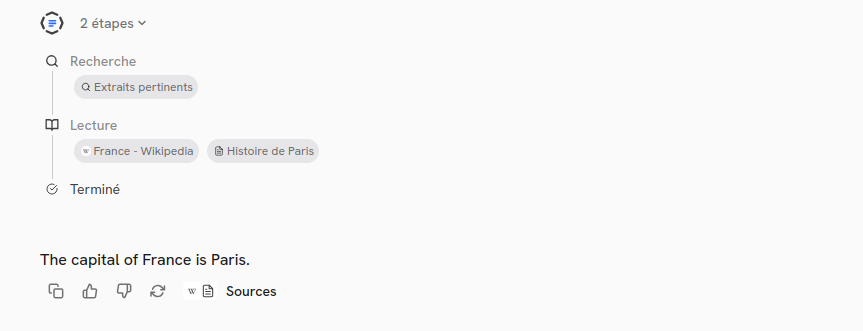 When clicking on the sources tag, it opens a side panel with the sources details:
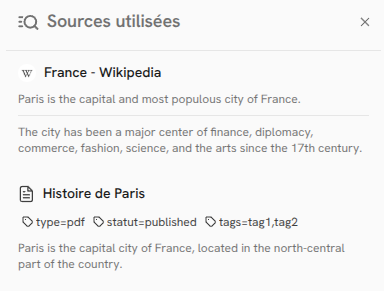
Note that the display is sources-oriented and not extracts-oriented. Indeed sources are sorted by the maximum relevancy score of their extracts, and extracts are grouped under their respective sources, sorted by their relevancy score.
answer = "The capital of France is Paris [1]. It has been the capital since 987 AD [1, 3]."
sources = [
    {
        "title": "France - Wikipedia",
        "link": "https://en.wikipedia.org/wiki/France",
        "source_type": "web_source",
        "citation_number": 1,
        "extracts": [
            {
                "content": "Paris is the capital and most populous city of France.",
                "relevancy_score": 0.95,
            },
            {
                "content": "The city has been a major center of finance, diplomacy, commerce, fashion, science, and the arts since the 17th century.",
                "relevancy_score": 0.85,
            },
        ],
    },
    {
        "title": "Relationships between the United States and France - Wikipedia",
        "link": "https://en.wikipedia.org/wiki/France%E2%80%93United_States_relations",
        "source_type": "web_source",
        "citation_number": 2,
        "extracts": [
            {
                "content": "The United States and France have a long history of diplomatic, cultural, and economic relations.",
                "relevancy_score": 0.5,
            }
        ],
    },
    {
        "filename": "Histoire de Paris",
        "type": "pdf",
        "key": "documents/paris_au_xxe_siecle.pdf",
        "source_type": "rag_source",
        "citation_number": 3,
        "extracts": [
            {
                "content": "Paris is the capital city of France, located in the north-central part of the country.",
                "relevancy_score": 0.9,
            }
        ],
    },
]
Displayed as:

Source side panel:
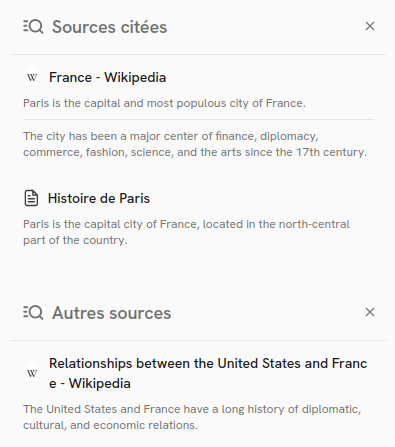
Their is a clear separation between cited sources (1 and 3) which are directly referenced in the answer text, and non-cited sources (2) which are not directly referenced but still relevant to the answer and displayed in the sources panel.
Integration Checklist
Before associating your deployment to a Craft AI assistant, make sure you have completed the following checklist:
- Deployment uses
execution_rule="endpoint" - Input mapping includes a file input mapped to
input_body_file - Output mapping includes a string output mapped to
answer - Tested with simple text messages
- Tested with file attachments (if applicable)
- Sources include proper
citation_numberandsource_type(if using sources)
Reserved prefixes:
- Deployment does not have the prefix
craftgpt- - No Data Store folder with the prefix
craftgpt-have been added - No environment variable with the prefix
CRAFTGPT_have been added
Custom Healthcheck deployment
The public API route <instance_name>.craft.ai/api/health-craftgpt-custom can be used to check the health of your application.
The route returns a 200 OK response if all deployments on the studio are healthy. It returns a 500 Internal Server Error otherwise.
In order to add specific health-checks, deploy a custom healthcheck deployment.
This deployment has to follow this schema:
- Input: No mapping to the endpoint
- Output:
{"status": string, "details": json},statusbeing the status (i.e.OK, any other status will be considered a failing status) anddetailsbeing a json containing additionnal information.
After deploying the custom healthcheck, contact the Craft AI so that the deployment is triggered by the public API route.
Detailed Schema Reference
Input format
InferenceInputBody
pydantic-model
Bases: BaseModel
Input payload for CraftAI LLM inference endpoint.
This schema defines the structure of the JSON payload
provided in the input_body_file when the deployment is triggered by the CraftGPT chat app.
Fields:
-
messages(list[CraftAIMessage])
Source code in shared/pydantic_classes/schemas.py
messages
pydantic-field
Conversation history as a list of messages, alternating between user and assistant roles. Cf. CraftAIMessage schema for message structure.
CraftAIMessage
pydantic-model
Bases: BaseModel
Each message in the messages array of the input payload contains a role and an array
of content blocks.
Fields:
Source code in shared/pydantic_classes/schemas.py
content
pydantic-field
List of content blocks (text or file references)
role
pydantic-field
The role of the message sender
TextBlock
pydantic-model
Bases: BaseModel
A text content block in a message.
Fields:
Source code in shared/pydantic_classes/schemas.py
text
pydantic-field
The actual text content
type
pydantic-field
The block type identifier
S3Block
pydantic-model
Bases: BaseModel
An S3 file reference block in a message.
Fields:
Source code in shared/pydantic_classes/schemas.py
s3_key
pydantic-field
The S3 object key where the file is stored
type
pydantic-field
The block type identifier
Output Payload Schema
InferenceOutputBody
pydantic-model
Bases: BaseModel
Output payload from CraftAI LLM inference endpoint.
This schema defines the structure of the response returned by the CraftAI deployment after processing an inference request. Each field is an output of the endpoint.
Fields:
-
answer(str) -
sources(list[WebSource | DocumentSource]) -
error(dict[str, Any] | None) -
consumed_tokens(list[ConsumedTokensModel] | None) -
specific_info(dict[str, Any] | None)
Source code in shared/pydantic_classes/schemas.py
answer
pydantic-field
The generated response text from the LLM. Ouput type: STRING
consumed_tokens = None
pydantic-field
Optional token consumption details. Output type: JSON
error = None
pydantic-field
Error field - should be None for successful responses. Output type: JSON
sources
pydantic-field
List of sources cited in the answer (web pages or documents). Output type: JSON
specific_info = None
pydantic-field
Optional field for any additional information specific to the inference. Output type: JSON
WebSource
pydantic-model
Bases: BaseModel
A web source citation with extracts.
Fields:
-
title(str) -
link(str) -
source_type(Literal['web_source']) -
extracts(list[SourceExtract]) -
citation_number(int | None) -
metadata(dict[str, str | list[str]])
Source code in shared/pydantic_classes/schemas.py
citation_number = None
pydantic-field
Citation number for referencing in the answer
extracts
pydantic-field
Relevant extracts from the web page
link
pydantic-field
URL of the web page
metadata
pydantic-field
Optional metadata about the web source
source_type
pydantic-field
Type identifier for web sources
title
pydantic-field
Title of the web page
DocumentSource
pydantic-model
Bases: BaseModel
A document source citation with extracts.
Fields:
-
filename(str) -
key(str) -
source_type(Literal['rag_source']) -
extracts(list[SourceExtract]) -
citation_number(int | None) -
metadata(dict[str, str | list[str]])
Source code in shared/pydantic_classes/schemas.py
citation_number = None
pydantic-field
Citation number for referencing in the answer
extracts
pydantic-field
Relevant extracts from the document
filename
pydantic-field
Name of the document file
key
pydantic-field
S3 key or identifier for the document
metadata
pydantic-field
Optional metadata about the document source
source_type
pydantic-field
Type identifier for RAG document sources
SourceExtract
pydantic-model
Bases: BaseModel
An extract from a source document with relevancy score.
Fields:
-
content(str) -
relevancy_score(float)
Source code in shared/pydantic_classes/schemas.py
content
pydantic-field
The extracted text content
relevancy_score
pydantic-field
Score indicating how relevant this extract is to the query